Estimated reading time: 9 minutes
The same discussion every day: Who clears the table? Who takes out the trash? Do you want to organize chores cleverly, award points and motivate your children? Then KidsChores is just the thing for Home Assistant. Set up in just a few minutes and bring gamification into everyday family life.
For detailed instructions and explanations of all configuration options, I recommend watching the YouTube video linked below. This video goes into detail about each individual setting, providing you with comprehensive instructions on how to set everything up correctly. Any code from the video can be found in this article, so you can use it directly without having to type it out.
What exactly is gamification?
Gamification means that typical game elements such as points, rewards, levels or badges are integrated into a non-game context - e.g. in the household. The advantage: tasks that would otherwise be boring or tedious are suddenly fun and encourage motivation, personal responsibility and a competitive spirit.
This is exactly where KidsChores comes in: Your child receives points for completed tasks, can "buy" rewards or earn badges - just like in a game, but with real benefits for everyday life.
What is KidsChores?
KidsChores is a Custom integration for Home Assistantwhich allows you to organize, track and reward chores for your children. It creates sensors and entities for tasks, rewards and approvals and can be used completely locally - i.e. without the cloud. All data stays with you.
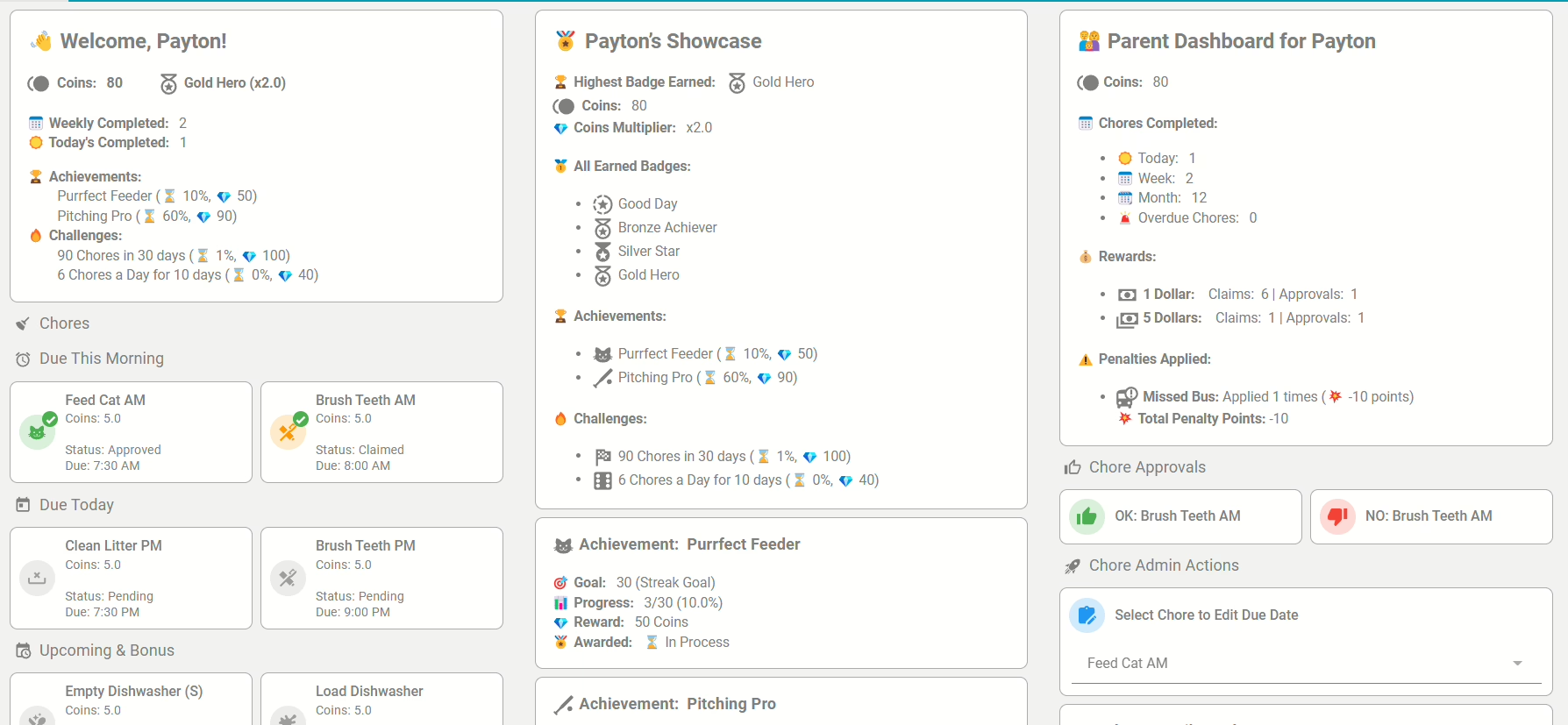
Functions at a glance
Define tasks (chores)
Create as many tasks as you like, e.g. "Tidy your room", "Set the table" or "Fold the laundry". Each task is assigned points. Your children see these tasks in their own dashboard and can "claim" them - i.e. submit them for approval - once they have been completed.
🧠 Example: Take out the trash every Tuesday = 10 points
✅ Approval system
As a parent, you can approve or reject tasks at the touch of a button. You can do this via the Lovelace dashboard, your smartphone or even a smartwatch. Only approved tasks earn points!
✅ Points system & currencies
Define your own currencies: Stars, coins, hearts or emojis - you decide what your child collects. The points are freely adjustable and scalable - whether 5 or 500 per task.
💡 Example: 100 stars = 1 visit to the cinema
✅ Rewards system (Rewards)
Points can be exchanged for rewards. These are also fully configurable. The reward can be a physical item (e.g. a toy) or an activity (e.g. 1 hour of screen time).
📦 Example: "1x ice cream" for 30 points
✅ Shared choirs
Tasks can be assigned to several children at the same time. As soon as one of the children takes over and completes the task, it is marked as done for everyone.
🧹 Example: "Clean up the playroom" - whoever comes first gets the points!
Recurring tasks
KidsChores supports daily, weekly or monthly repetitions. This allows you to map out routines: e.g. brushing teeth daily or taking out the trash every Friday.
✅ Badges, Achievements & Streaks
This is where the fun really begins! KidsChores comes with its own reward system:
- Badges for special achievements
- Streaks for daily errands in succession
- Challenges for special tasks or milestones
🏅 Example: "Tidied up 5 days in a row" = special badge
Calendar integration
All planned tasks are also displayed in the Home Assistant calendar - ideal for the whole family.
Lovelace Dashboard (Ready-to-Use)
A finished front end with two views:
- Parent viewApprovals, points overview, task status
- Children's view: To-do list, rewards, progress
The dashboard can be set up manually. You can find the dashboards here. The installation and integration is described in detail there.
Open your Home Assistant UI. Navigate to Settings > Dashboards > Create new dashboard. Then you can insert the YAML code from the respective dashboard and, if applicable, the user names used, entity_ids or point symbols according to your configuration.
Roles & authorizations
You can set up any number of user roles: Parents, children, caregivers - all with their own rights. This means you always remain in control.


What is Home Assistant?
Home Assistant is an open-source platform for home automation that aims to connect all devices in the home and control them centrally. It was developed to provide a unified user interface and simple, flexible control for a wide range of smart home devices from different ecosystems. Here are some points in favor of Home Assistant:
- CompatibilityHome Assistant supports thousands of devices and services from various manufacturers, including lighting, air conditioning, heating, cameras, weather sensors, voice assistants and more.
- Local controlUnlike many commercial smart home platforms that rely on cloud services, Home Assistant runs locally on your network. This means increased privacy and reliability, as your smart home devices work even without an active internet connection.
- Automation and scenesOne of the main features of Home Assistant is the ability to create complex automations and scenarios. For example, you can have lights turn on automatically when it gets dark, or turn on the heating when the temperature drops below a certain level.
- Simple user interfaceHome Assistant offers a user-friendly interface that makes it easy to monitor and control devices. This interface is fully customizable.
- Integration with voice assistantsHome Assistant can be integrated with voice assistants such as Amazon Alexa or Google Assistant to enable voice-controlled control of your smart home devices.
- Open source and community-drivenSince Home Assistant is open source, it is supported by an active community that is constantly developing new integrations and improving existing ones.
- Data protection and securityAs a locally running platform, Home Assistant has the advantage that the data remains within its own network. This protects privacy and increases security compared to cloud-based solutions.
In summary, Home Assistant is a powerful and flexible solution for those who want to design their own smart home and control their devices centrally, regardless of the manufacturer or ecosystem.
Installation of HACS and integration of KidsChores in Home Assistant
Step 1: Installing HACS in Home Assistant
Home Assistant Community Store (HACS) is a custom add-on for Home Assistant that provides access to a variety of custom integrations and plugins developed by the community. How to install HACS:
- Check requirements: Make sure that your Home Assistant is ideally up to date.
- Download Execute script: Open a terminal for the Docker container version or the core version.
- Docker: Dial into the container with:
docker exec -it homeassistant bashor (similar) - Core: Switch to the user who is running Home Assistant
- Execute the following command for both variants:
wget -O - https://get.hacs.xyz | bash -
- Docker: Dial into the container with:
- Restarting the Home Assistant: After the files have been copied, restart Home Assistant.
- Integrate HACS into Home AssistantGo to "Configuration" > "Integrations" > "Add" in the Home Assistant interface and search for HACS. Add it and enter your GitHub token if prompted.
For the supervised version, please refer to the Documentation of HACS itself to read about the installation.
Step 2: Add KidsChores integration via HACS
Once HACS is installed, you can simply add KidsChores:
- Open HACS: Go to HACS in the Home Assistant interface.
- Search for integrationClick on "Integrations" and use the search function to search for "KidsChores".

- Install KidsChoresFind KidsChores in the list and click on "Install". This will add the integration to your Home Assistant.
- Restarting the Home Assistant: Start Home Assistant again to apply the changes.
- Configure KidsChoresAfter restarting, you can set up and customize KidsChores via "Configuration" > "Integrations" in Home Assistant.
Conclusion
With these steps, you have successfully installed HACS in your Home Assistant and added the KidsChores integration. This powerful combination opens up a world of additional features and customizations that have been and are being developed by the Home Assistant community. More blog posts and videos on useful integrations to follow. If you don't want to miss out, subscribe to my YouTube channel!
💡 KidsChores also works without children - for shared flats, couples or yourself!
Even if the name KidsChores suggests that the tool is only intended for parents - that's not true. You can easily customize the integration and use it in every life situation use sensibly:
- In a shared flat (WG)to distribute tasks such as cleaning, shopping or washing up fairly. Each flatmate receives their profile, collects points and can set rewards (e.g. "Next pizza is on me").
- In a relationshipto regulate routine tasks transparently and introduce small challenges or rewards in a playful way.
- For you aloneif you want to motivate yourself - e.g. with streaks, badges or rewards for productivity, sport or household tasks.
The powerful dashboard and configurable points & rewards systems make KidsChores Much more than just a children's task tool - it's a complete gamification framework for your everyday life!
And best of all: no additional app is needed. Everything runs native in Home Assistantwithout cloud, without subscription - 100 % local, 100 % customizable.
YouTube video implementation
Conclusion: Smart motivation for more family harmony
KidsChores is more than just a to-do list. It's a complete reward system for your smart home - child-friendly, privacy-friendly and flexibly customizable. With this integration, you can turn everyday stress into a game that benefits your whole family.


0 Comments