Estimated reading time: 13 minutes
Are you looking for the perfect icebreaker for your next house party, but don't fancy board games with endless sets of rules? If you already have a home assistant running, you're already sitting on the ultimate party machine. With the open source integration Beatify turn your smart speakers into an interactive multiplayer music quiz reminiscent of games like Hitster only completely digital, seamlessly integrated into your smart home and 100 % local.
Forget countless app downloads or the annoying dictation of your Wi-Fi password. In this article, I'll show you how Beatify works, what ingenious features it has and how to set up the game for the perfect game night.
For detailed instructions and explanations of all configuration options, I recommend watching the YouTube video linked below. This video goes into detail about each individual setting, providing you with comprehensive instructions on how to set everything up correctly. Any code from the video can be found in this article, so you can use it directly without having to type it out.
What is Home Assistant?
Home Assistant is an open-source platform for home automation that aims to connect all devices in the home and control them centrally. It was developed to provide a unified user interface and simple, flexible control for a wide range of smart home devices from different ecosystems. Here are some points in favor of Home Assistant:
- CompatibilityHome Assistant supports thousands of devices and services from various manufacturers, including lighting, air conditioning, heating, cameras, weather sensors, voice assistants and more.
- Local controlUnlike many commercial smart home platforms that rely on cloud services, Home Assistant runs locally on your network. This means increased privacy and reliability, as your smart home devices work even without an active internet connection.
- Automation and scenesOne of the main features of Home Assistant is the ability to create complex automations and scenarios. For example, you can have lights turn on automatically when it gets dark, or turn on the heating when the temperature drops below a certain level.
- Simple user interfaceHome Assistant offers a user-friendly interface that makes it easy to monitor and control devices. This interface is fully customizable.
- Integration with voice assistantsHome Assistant can be integrated with voice assistants such as Amazon Alexa or Google Assistant to enable voice-controlled control of your smart home devices.
- Open source and community-drivenSince Home Assistant is open source, it is supported by an active community that is constantly developing new integrations and improving existing ones.
- Data protection and securityAs a locally running platform, Home Assistant has the advantage that the data remains within its own network. This protects privacy and increases security compared to cloud-based solutions.
In summary, Home Assistant is a powerful and flexible solution for those who want to design their own smart home and control their devices centrally, regardless of the manufacturer or ecosystem.
What exactly is Beatify?
Beatify is a music rate game that runs completely locally on your Home Assistant. The principle is reminiscent of popular analog party games: A song is played via your smart speaker and your guests have to use their smartphone to guess the correct year of release as quickly as possible.
The best thing about it? It runs without a cloud subscription. Your data stays in your home network - fast, private and extremely reliable.
The game principle: zero friction for your guests
The biggest hurdle with digital party games is often onboarding. Beatify brilliantly eliminates this problem: 10 seconds from scan to play.
As the host, you start Beatify via your Home Assistant dashboard. A QR code is generated, which you can simply display on the TV or print out and place on the table. Your guests scan the code with their cell phone camera and are immediately in the game - via the mobile browser. No accounts. No apps. No need to log in to your home Wi-Fi (provided you have external access via Nabu Casa or Cloudflare).
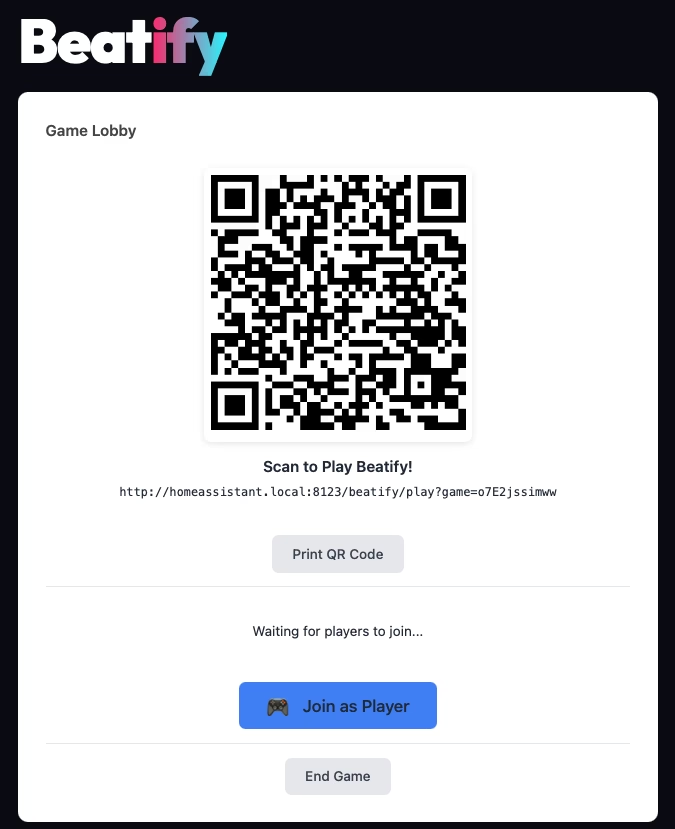
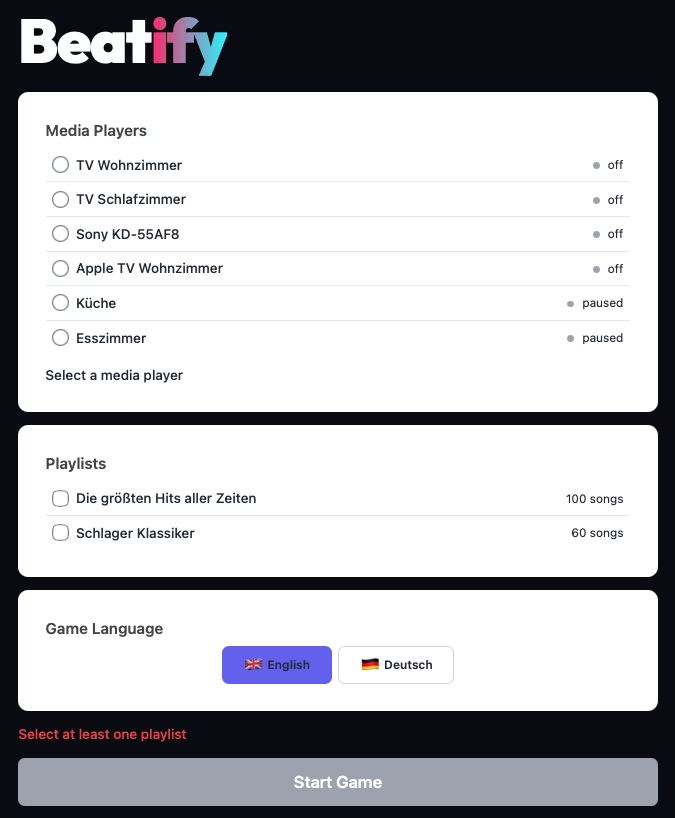
A song plays from your smart speakers and the race against time begins: In which year was this track released?
The features: More than just guessing music
The developer has massively upgraded Beatify since version 2.0. It is not just a simple quiz, but brings real tactical depth and game show feeling. Here are the translated main functions from the developer documentation:
- The thrill (The Rush): A song starts and the clock ticks down relentlessly. You know the song by heart... but was it 1985 or 1987?
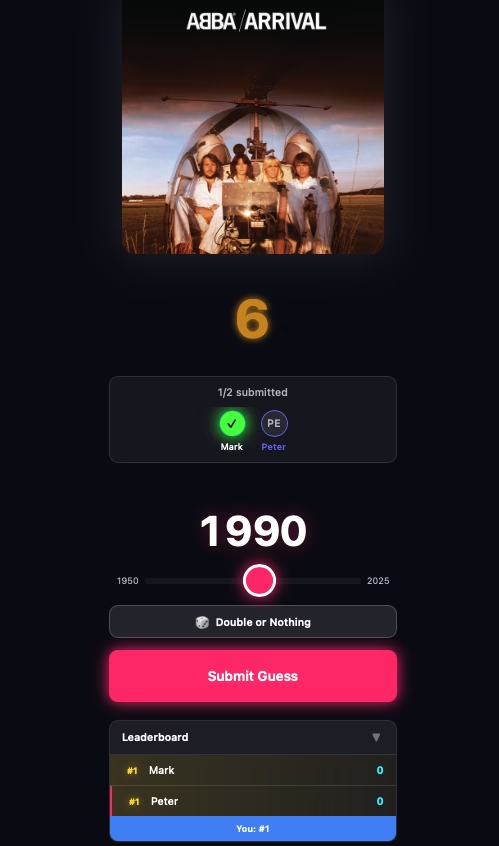
- Strategy & Risk (The Strategy): If you type faster, you collect bonus points (up to 2x). If you manage series (streaks of 3, 5 or 10 correct answers), there are big multipliers. Are you 100 % sure about the current song? Then use the „Double or Nothing“ function (all or nothing) and double your stake!
- The Reveal: As soon as the year drops on the displays, the room escalates. The game shows in real time who landed an exact hit and who was off by decades.
- The top 8 highlights: After the game is before the game. Beatify automatically generates a „Top 8“ ranking of the best moments from the session at the end. Who had the fastest tip? Who had the most epic comeback? Your guests can even share their results directly as an emoji card on social media.
- Quick rematch: Lost? One click is all it takes for the same team to start the next round with the same settings.
- Full host control: As an admin, you play as normal, but have additional rights. You can skip songs, adjust the lap time (15s, 30s, 45s), set the difficulty or control the volume.
Playlists: Built-in classics vs. your own JSON lists
There are often myths surrounding the tool, so let's be clear: Beatify does not simply fetch the music metadata by simply inserting a Spotify link in the dashboard.
Instead, the game comes with Over 20 lovingly curated playlists with more than 2,300 songs with. Including highlights such as Eurodance 90s, Motown & Soul Classics, Eurovision winner, Yacht Rock or Top 100 Dutch.
You want your own songs? No problem! The system is so flexible that you can create your own playlists in the .json-format and store them in Home Assistant. This allows you to map your friends' musical tastes - whether it's regional punk rock, a list of anime intros or your own personal vacation hits. The whole thing is then played locally via Home Assistant's media player integrations (Spotify, Apple Music, YouTube Music or local files).
Compatibility: Which speakers work?
It must be clearly stated that this is the current status and the tool is being developed at full speed. So if your speaker is not included, it is better to check the repository to see if it is not the case after all.
To ensure that the music reaches everyone synchronously and reliably, Beatify currently supports three main audio output channels:
- Music Assistant: (The clear recommendation!) The ingenious add-on for Home Assistant, with which you can control almost any speaker (including Google Cast and Apple HomePods) perfectly.
- Sonos: Direct support for your Sonos speakers.
- Alexa: Your Amazon Echo devices can also be recorded directly.


Installation of HACS and integration of Beatify in Home Assistant
Step 1: Installing HACS in Home Assistant
Home Assistant Community Store (HACS) is a custom add-on for Home Assistant that provides access to a variety of custom integrations and plugins developed by the community. How to install HACS:
- Check requirements: Make sure that your Home Assistant is ideally up to date.
- Download Execute scriptOpen a terminal for the Docker container version or the core version.
- Docker: Dial into the container with:
docker exec -it homeassistant bashor (similar) - Core: Switch to the user who is running Home Assistant
- Execute the following command for both variants:
wget -O - https://get.hacs.xyz | bash -
- Docker: Dial into the container with:
- Restarting the Home Assistant: After the files have been copied, restart Home Assistant.
- Integrate HACS into Home AssistantGo to „Configuration“ > „Integrations“ > „Add“ in the Home Assistant interface and search for HACS. Add it and enter your GitHub token if prompted.
For the supervised version, please refer to the Documentation of HACS itself to read about the installation.
Step 2: Add Beatify integration via HACS
Once HACS is installed, you can simply add Beatify:
- Open HACS: Go to HACS in the Home Assistant interface.
- Store custom repositoryNavigate to „Custom Repositories“ via the three dots at the top right.
- Add the repository link: https://github.com/mholzi/beatify and select „Integration“ as the category.
- Search for integrationClick on „Integrations“ and use the search function to search for „Beatify“.
- Install BeatifyFind Beatify in the list and click on „Install“. This will add the integration to your Home Assistant.
- Restarting the Home Assistant: Start Home Assistant again to apply the changes.
- Configure BeatifyAfter restarting, you can set up and customize Beatify via „Configuration“ > „Integrations“ in Home Assistant.
Conclusion
With these steps, you have successfully installed HACS in your Home Assistant and added the Beatify integration. This powerful combination opens up a world of additional features and customizations that have been and are being developed by the Home Assistant community. More blog posts and videos on useful integrations to follow. If you don't want to miss it, subscribe to my YouTube channel!
Tailor-made for your lap: the settings
Every party crew is different - and that's exactly why Beatify gives you a completely free hand with the rules of the game. Before the quiz starts, you can customize the setup in the menu to perfectly suit your guests:
- The difficulty levels (easy, normal, hard): Do you have real music nerds over who can date every track to the exact year? Then set the game to „Hard“. For a casual round, on the other hand, the „Easy“ mode is forgiving of a few years' deviation and still rewards players with points.
- The lap timer: Decide how much time your guests have for their tip. You can choose between 15, 30 or 45 seconds per song. A short timer of 15 seconds ensures extreme time pressure and funny panic tippers. With 45 seconds, on the other hand, you have enough time to reminisce („Wait, that was on our graduation trip!“).
Real-time scores and the nasty „steal“ feature
Gone are the days when someone had to laboriously calculate points with a piece of paper and pen. Beatify takes on the role of the strict notary! Every player can permanently see their own score, the points they have collected so far and their exact position in the live ranking on their smartphone in the UI. So you know every second whether you are breathing down the neck of the leader or lagging behind in last place.
The dynamic user interface for the special features is particularly ingenious: if you manage a „streak“ (3 correct answers in a row), a glowing „Steal Available“ button appears on your display. You have absolutely no idea about the current song? Click on the button, see who at the table has already logged in their answer and steal the tip of your smartest teammate!
The small features that make a big difference
If you read the developer's information carefully, you realize that someone has programmed a game for real parties. It's the little details that make the experience so perfect:
- The „Play Along“ mode: As the host (admin), you don't have to sit on the sidelines sadly. You play along as normal, but also have discreet admin controls on your cell phone. This allows you to adjust the volume in the middle of a match, skip a bad track, end the game prematurely or pause it briefly when the pizza delivery man rings.
- Multilingual: The entire interface supports English and German as well as other languages, which ensures that there are no language barriers.
- Large groups? No problem: According to the developer, the game is designed and tested for rounds with 20+ players. So your Raspberry Pi won't fall to its knees even with a really full hut.
- Mobile-First Design (Neon Dark Theme): As soon as the game opens in the mobile browser, it looks highly professional. No loveless smart home menu, but a really chic „Neon Dark Theme“ that saves the battery and immediately creates a real late-night game show feeling.
YouTube video implementation
Conclusion
Beatify is a prime example of what the home assistant community can achieve. It transforms an already useful smart home into an interactive entertainment center. It's fast, looks insanely good on a smartphone (neon dark theme!) and brings a real competitive edge to the home. Since it's completely open source, ad-free and local, there's really no way around installing it immediately for the next weekend.


0 Comments